Python Installation Guide
Shared guide index: lang.md
Step 1: Download Python Installer
- Go to the official Python download page.
- Download Python 3 for Windows;
Python 3.11.9is recommended. - Run the installer.
Official site:
- https://www.python.org/downloads/
- https://www.python.org/downloads/release/python-3119/
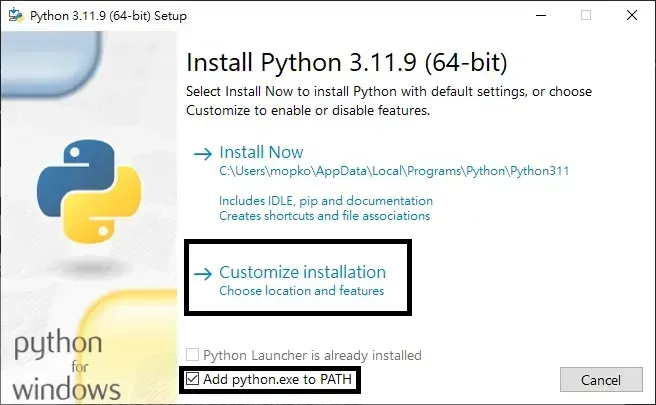
Step 2: Customize Install and Add to PATH
- In the installer, click
Customize installation. - Make sure Python is added to PATH.
- Continue to the next step.
Step 3: Advanced Options and Install
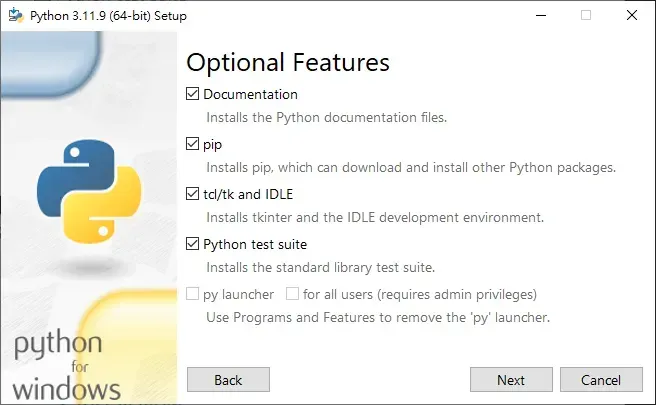
- Keep
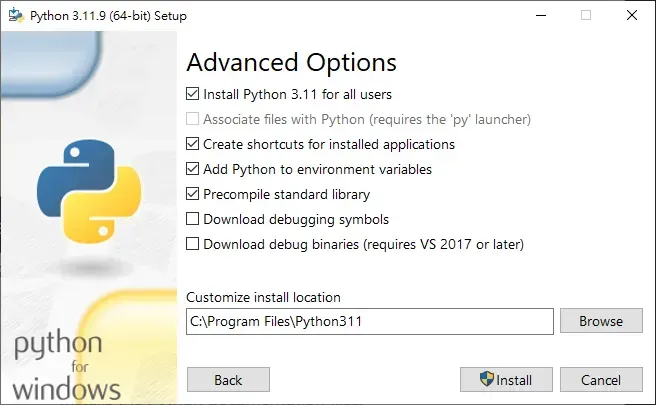
pipenabled. - Enable install options for all users if needed.
- Click
Install.
Step 4: Complete Installation
- Wait for installation to finish.
- If shown, run path length fix.
- Close the installer.
Step 5: Verify in Terminal
Run:
python --version
pip --version
If both commands return versions, installation is complete.